¶ TRMNL Setup Guide
This guide walks through connecting dayGLANCE to your TRMNL e-ink display after adding the dayGLANCE recipe.
¶ Overview
dayGLANCE pushes a snapshot of your day — tasks, habits, routines, and stats — to your TRMNL device via a Private Plugin webhook. The integration is entirely client-side. No server credentials or environment variables are required.
¶ Prerequisites
- A TRMNL device and account at usetrmnl.com
- The dayGLANCE recipe added to your TRMNL dashboard
- dayGLANCE open in a desktop browser (the TRMNL integration is available in the web app only)
¶ Step-by-Step Setup
¶ 1. Copy Your Webhook URL
- Log in to your TRMNL dashboard at usetrmnl.com.
- Open the dayGLANCE plugin (added via the recipe).
- Copy the Webhook URL — it looks like:
https://usetrmnl.com/api/custom_plugins/<your-uuid>
¶ 2. Connect dayGLANCE
- Open dayGLANCE and go to Settings.
- Scroll to the TRMNL Dashboard section.
- Paste your Webhook URL into the Webhook URL field.
- (Optional) Enter an API Key — see API Key behavior below.
- Click Enable & Sync.
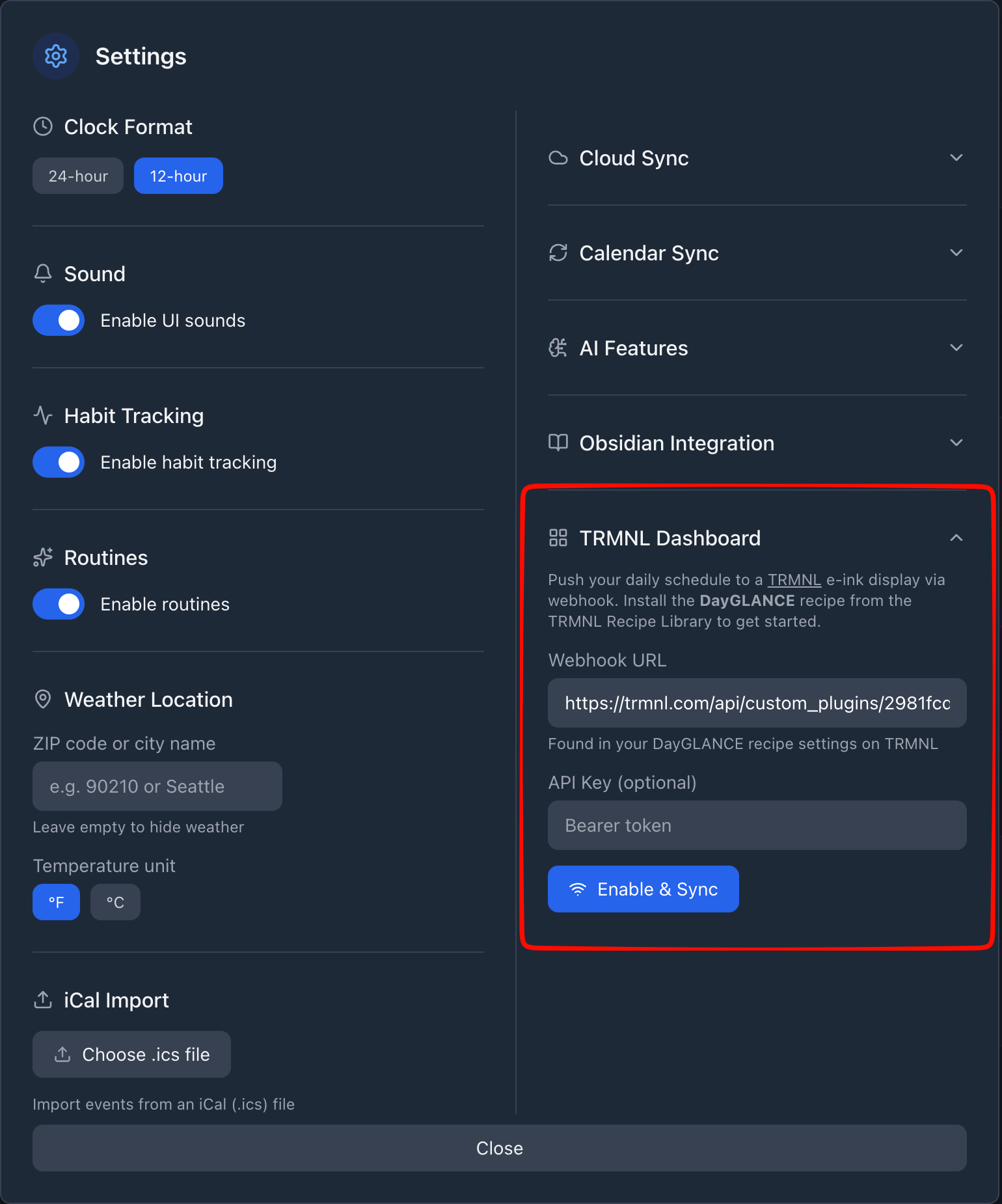
dayGLANCE will immediately push your current day's data to TRMNL and confirm with "Data sent to TRMNL."
Note: Once enabled, the button changes to Sync Now and a last-synced timestamp is shown. You can use Sync Now at any time to push an immediate update.
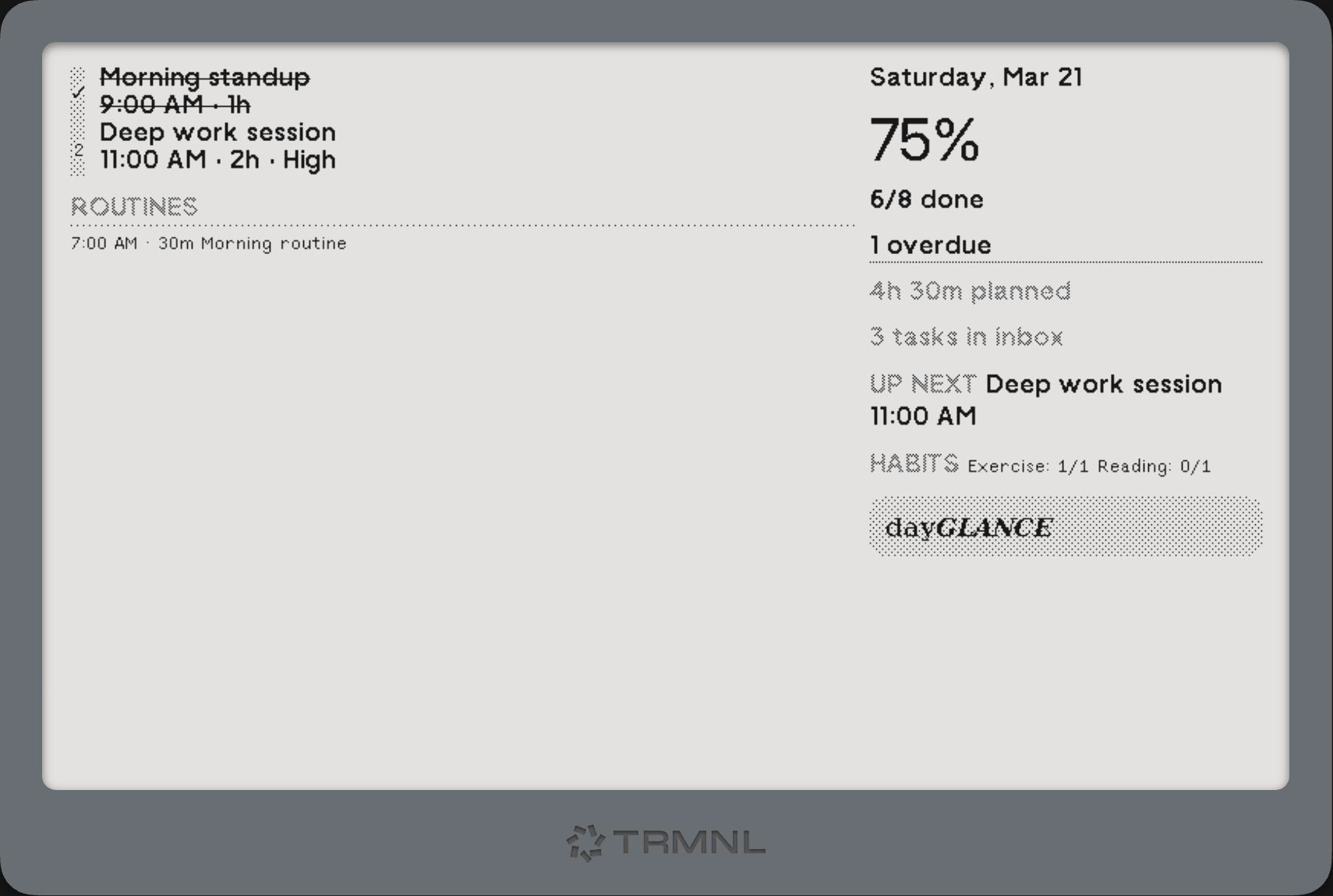
Your device will display your dayGLANCE data on its next polling cycle.
¶ API Key (Optional)
The API Key field is additive — it does not replace the webhook URL authentication, it adds a layer on top of it.
- Without API Key: Requests are sent with only
Content-Type: application/json. The webhook URL itself acts as the shared secret. - With API Key: An
Authorization: Bearer <your-key>header is included in every request.
For standard TRMNL Private Plugin setups you do not need this. You would only use it if TRMNL adds mandatory bearer token verification, or if you have a proxy in front of the webhook that requires a token.
The API Key is stored locally in your browser's localStorage and never sent anywhere other than the TRMNL webhook URL you configured.
¶ Sync Behavior
| Behavior | Detail |
|---|---|
| Auto-sync triggers | Any change to tasks, habits, routines, or the selected date |
| Debounce | Waits 10 seconds after the last change before pushing |
| Throttle | Maximum one push every 2 minutes |
| Rate limit backoff | If TRMNL returns HTTP 429, backoff increases exponentially: 5 min → 10 → 20 → 40 → 60 min (capped). Resets on next successful push. |
| Manual sync | Sync Now is always available when the integration is enabled |
¶ Data Storage
All TRMNL configuration is stored in your browser's localStorage — nothing is sent to dayGLANCE servers.
| Key | Contents |
|---|---|
day-planner-trmnl-config |
{ webhookUrl, apiKey, enabled } |
day-planner-trmnl-last-synced |
ISO timestamp of the last successful push |
Clearing your browser storage will remove the TRMNL configuration. You will need to re-enter your Webhook URL.
¶ Troubleshooting
| Symptom | Likely Cause | Fix |
|---|---|---|
| "Sync failed" with no further detail | Network error or wrong webhook URL | Double-check the webhook URL copied from TRMNL |
| HTTP 401 / 403 error | TRMNL requires a bearer token | Enter your bearer token in the API Key field |
| HTTP 429 error | Too many pushes in a short time | dayGLANCE will retry automatically using exponential backoff (5 → 10 → 20 → 40 → 60 min). Resets after a successful sync. |
| Display shows stale data | Plugin not saved in TRMNL | Make sure the plugin is saved in your TRMNL dashboard |
| Routines not appearing | Feature disabled or all past | Enable Routines in Settings; routines past their end time are filtered out |
| Habits not appearing | No habits configured | Add habits in the Habits section of dayGLANCE |
¶ Webhook Payload Reference
Every sync sends a single POST request to your webhook URL:
POST https://usetrmnl.com/api/custom_plugins/<your-uuid>
Content-Type: application/json
Authorization: Bearer <apiKey>   ← only if API Key is configured
Body:
{
  "merge_variables": { ... }
}
The payload is kept under 2 KB to stay within TRMNL's free-tier limits.
¶ merge_variables fields
¶ Date & Time
| Field | Type | Example | Description |
|---|---|---|---|
date |
string | "2026-03-20" |
Selected date in YYYY-MM-DD format |
day_name |
string | "Friday" |
Full day name |
date_label |
string | "Mar 20" |
Short human-readable date |
current_time |
string | "14:30" or "2:30 PM" |
Current time (respects your 12/24h setting) |
weather |
string | "" |
Reserved for future use; always empty |
¶ Task Stats
| Field | Type | Example | Description |
|---|---|---|---|
total |
number | 8 |
Countable tasks today (excludes imported calendar events) |
completed |
number | 3 |
Tasks marked complete |
overdue |
number | 1 |
Incomplete tasks whose start time has passed |
pct |
number | 37 |
Completion percentage (completed / total * 100) |
time_planned |
string | "3h 45m" |
Total scheduled duration for today's tasks |
inbox_count |
number | 4 |
Unscheduled (inbox) tasks not yet completed |
¶ Schedule Array
schedule — today's tasks sorted by start time, each item:
{
  "time":   "9:00 AM",
  "dur":    "1h 30m",
  "title":  "Team standup",
  "done":   false,
  "pri":    "High",
  "allDay": false,
  "past":   false
}
titleis truncated to 40 charactersprivalues:"","Low","Med", or"High"done: trueandpast: trueitems render with strikethrough in the Full template
¶ Upcoming Array
upcoming — next 3 incomplete, non-all-day tasks starting at or after the current time:
{
  "time":  "3:00 PM",
  "title": "Review PR"
}
title is truncated to 32 characters.
¶ Next Task
next_task — the first item from upcoming, or null if none:
{
  "time":  "3:00 PM",
  "title": "Review PR"
}
¶ Habits Array
habits — up to 5 habits, in the order they appear in your habit list:
{
  "name":   "Meditation",
  "count":  2,
  "target": 3,
  "pct":    67
}
name is truncated to 20 characters. pct is capped at 100.
¶ Routines Array
routines — up to 8 of today's routines (only included if Routines is enabled; routines past their end time are excluded; example routines are always excluded):
{
  "name": "Morning Routine",
  "time": "7:00 AM",
  "dur":  "45m"
}
name is truncated to 30 characters. Routines are sorted: all-day first, then by start time.
¶ Daily Note
| Field | Type | Example | Description |
|---|---|---|---|
note |
string | "Remember to call..." |
First 80 characters of today's daily note, or "" |